How to Track AI Referral Traffic in GA4 (ChatGPT, Claude, Gemini & More)
AI referral traffic is visits to your website from AI platforms like ChatGPT, Claude, Perplexity, and Gemini. Users click links these platforms include in their responses. The problem is that GA4 does not track this traffic accurately by default. Most of it gets lumped into “Direct” or generic “Referral” buckets where it becomes invisible. Setting up a custom channel group with the right regex patterns fixes this in about 15 minutes.
What Exactly Is AI Referral Traffic?
AI referral traffic occurs when a user clicks a link that an AI assistant recommended. This is fundamentally different from organic search traffic. The user did not type a query into Google. They asked an AI and followed its suggestion.
AI-driven sessions grew 527% year-over-year in early 2025. That number reflects a genuine shift in how people discover and navigate to websites. If you are not tracking it, you are missing one of the fastest-growing acquisition channels on the internet.
This matters whether your AI traffic arrives organically or deliberately. Organic traffic comes when an AI cites your content unprompted. Deliberate traffic comes when you have taken steps to appear in AI-generated answers. Either way, you cannot optimise what you cannot see.
Why Does GA4 Miss AI Referral Traffic by Default?
GA4 was built around traditional referral patterns. Search engines pass a referrer string. Campaigns use UTM tags. AI platforms do not always follow these conventions. As a result, misattribution happens at every level.
Here is how AI traffic gets lost in GA4:
- Copy-paste behaviour: Many users copy a URL from a ChatGPT response and paste it into a new tab. No referrer is passed. GA4 records this as Direct traffic.
- Incomplete UTM tags: ChatGPT sometimes appends
utm_source=chatgpt.combut omitsutm_medium. GA4 places these sessions in the “Unassigned” channel. - Generic referral bucket: When users do click a link directly from Claude or Perplexity, GA4 lumps it into “Referral” alongside blog links and random backlinks — indistinguishable from everything else.
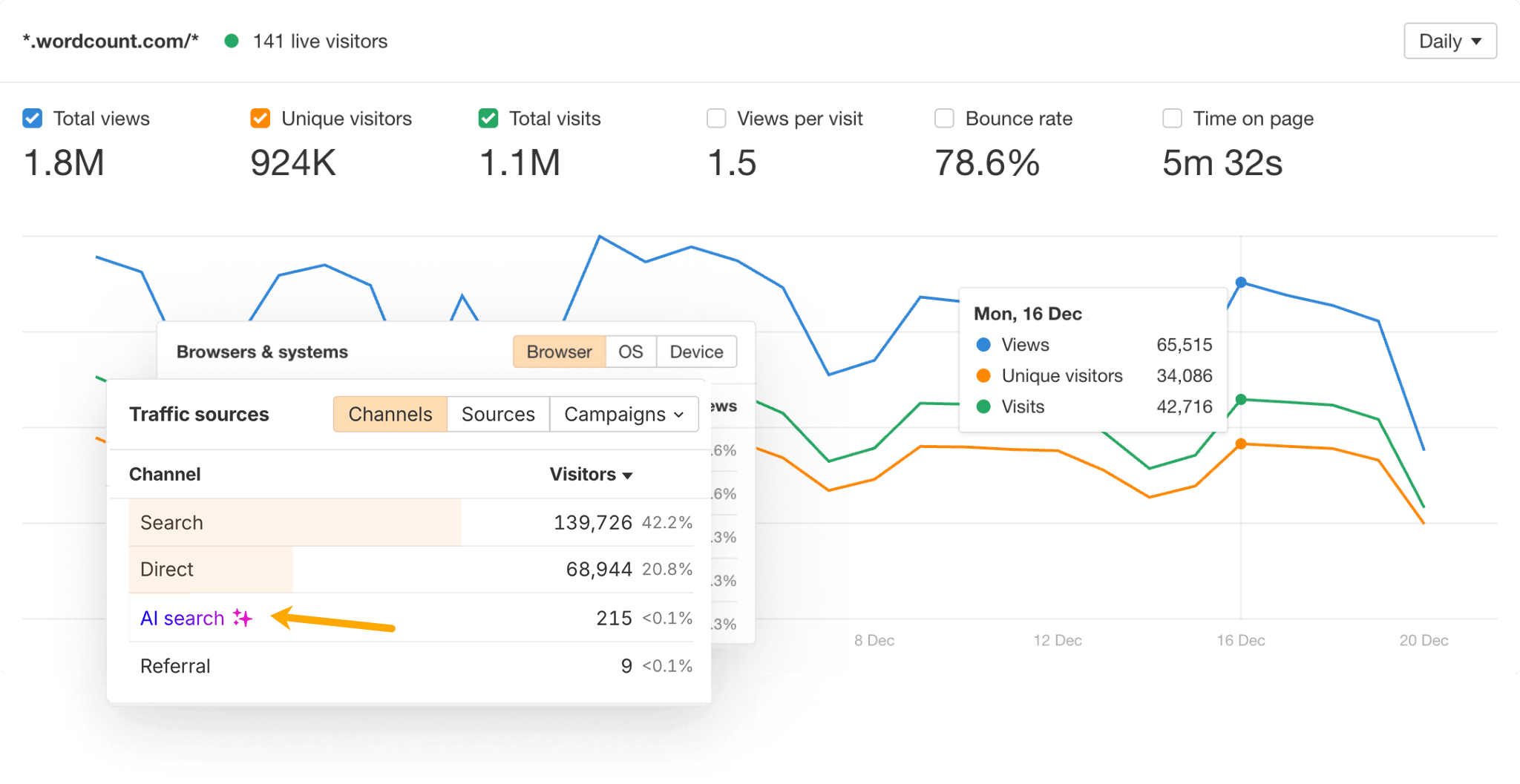
A significant portion of your AI referral traffic is hidden in plain sight. It gets recorded under channels that tell you nothing useful.
Which AI Platforms Send Trackable Referral Traffic?
Not all AI traffic is equally trackable. Here is what GA4 can and cannot capture:
- ChatGPT (chatgpt.com) — Trackable when users click links directly. Some sessions also tagged with
utm_source=chatgpt.com. - Claude (claude.ai) — Trackable as a referral domain when users click through from conversations.
- Perplexity (perplexity.ai) — Trackable. Perplexity is link-heavy in its responses, making it one of the more reliably attributed AI traffic sources.
- Gemini (gemini.google.com) — Trackable as a referral from the Gemini web app.
- Google AI Overviews — Not separately trackable. This traffic arrives tagged as
google / organicand cannot be isolated from regular search traffic in GA4. - Microsoft Copilot — Partially trackable via
bing.com/chatreferrers.
ChatGPT, Claude, Perplexity, and Gemini are the big four to focus on. Together they account for the vast majority of attributable AI referral traffic.
How Do You Set Up AI Referral Tracking in GA4?
Creating a Custom Channel Group in GA4 is the most reliable method. This lets you define an “AI Referral” channel that captures all relevant traffic sources in one reportable bucket.
Here is the step-by-step process:
- Go to Admin → Data Display → Channel Groups in your GA4 property.
- Click “Create New Channel Group” and name it something clear like “AI Traffic Tracking”.
- Add a new channel and name it “AI Referral”.
- Set the condition type to Session source and select matches regex.
- Enter the regex pattern (see below).
- Save and allow 24–48 hours for data to populate.
The custom channel group applies retroactively to your historical GA4 data. You will immediately see AI referral traffic going back to when your property started collecting data.
What Regex Pattern Should You Use for AI Sources?
This single regex captures the major AI referral sources across both the session source dimension and UTM-tagged sessions:
chatgpt\.com|claude\.ai|perplexity\.ai|gemini\.google\.com|bing\.com/chat|you\.com|phind\.com|copilot\.microsoft\.comApply this pattern to the Session source condition in your channel definition. For complete coverage, add a second condition using an OR rule. Target sessions where utm_source matches:
chatgpt\.com|openai|anthropic|perplexity|geminiWhy both conditions? GA4 attributes traffic based on whichever signal is present. Some visits have a referrer domain. Others carry UTM parameters. Covering both ensures you catch the full picture.
How Do You Validate the Setup Is Working?
Use the Explorations section in GA4 to verify your custom channel group is capturing data correctly.
Build a free-form exploration with these settings:
- Dimension: Session source/medium
- Metric: Sessions
- Filter: Session source contains “chatgpt” OR “claude” OR “perplexity”
Sessions appearing under those sources means your setup is working. If the numbers look lower than expected, that is normal. Copy-paste behaviour means a portion of AI referral traffic will always land in Direct and cannot be recovered.
For a quick sanity check, go to Reports → Acquisition → Traffic Acquisition. Filter the “Session source/medium” dimension to search for “chatgpt” or “perplexity” directly.
What Do You Do With AI Referral Traffic Data Once You Have It?
Tracking AI referral traffic is only useful if you act on what you find. Here is how to use the data:
Identify which pages AI platforms cite most. Look at landing pages for your AI Referral channel. These are the pages AI engines trust enough to recommend. They reveal what content format, depth, and structure AI tools prefer. This gives you a blueprint for what to publish next.
Measure conversion quality. AI-referred visitors tend to be further along in their research. Compare conversion rates and session duration for AI referral vs. organic search. In most cases, AI referral sessions last longer and convert better. The AI has already pre-qualified the visitor’s intent.
Compare AI platforms against each other. Perplexity traffic may behave differently from ChatGPT traffic. Breaking it down by source tells you where to focus your answer engine optimisation efforts.
If you want to accelerate results while your organic AI presence grows, you can also buy web traffic from AI platforms directly. Traffic Masters offers targeted visitor traffic from ChatGPT, Claude, and Gemini referrers. This lets you validate your pages and build engagement signals while earning organic AI citations takes time.
How Is AI Referral Traffic Different From Organic Search?
The difference matters more than most marketers realise. Organic search traffic arrives because your page ranked in Google’s index. AI referral traffic arrives because an AI system decided your content was credible and relevant enough to recommend.
AI systems do not rank pages — they cite sources. The criteria for citation differ from traditional ranking signals. E-E-A-T signals, structured content, direct answers, and factual depth carry more weight in AI citation decisions than in traditional SEO rankings.
This is why tracking AI referral traffic separately matters. It is a distinct acquisition channel with its own logic, optimisation levers, and conversion behaviour. Lumping it into “Direct” or “Referral” makes it impossible to understand or improve.
Should You Bother Tracking AI Traffic If Your Volume Is Low?
Yes — and this is particularly true right now. AI referral traffic is still in its early growth phase. Sites that establish tracking and measurement infrastructure today will be positioned to act on the data as volume scales.
The keyword “ai referral traffic” has low search volume today. However, so did “mobile traffic” in 2011 and “social referral traffic” in 2009. Both became major channels within 18–24 months. The trajectory here is similar.
Traffic Masters is one of the only providers delivering AI referral traffic at scale. Learn more about their AI traffic service if you want to test your pages with real AI-sourced visitors before organic volume matures.
Setting up the custom channel group in GA4 takes 15 minutes. The cost of not having that data is measured in missed optimisation opportunities and invisible ROI. This becomes increasingly true as AI-referred sessions continue to grow.
Quick Summary: AI Referral Traffic Tracking Checklist
- ✅ Create a Custom Channel Group in GA4 (Admin → Data Display → Channel Groups)
- ✅ Add an “AI Referral” channel using the regex pattern above
- ✅ Target both Session source and utm_source dimensions
- ✅ Validate using Explorations with a source/medium filter
- ✅ Monitor landing pages for AI-cited content
- ✅ Compare conversion rates: AI referral vs. organic search
- ✅ Review monthly as AI platform referral patterns evolve
AI referral traffic is real, growing fast, and converts well. The only question is whether your analytics setup is ready to capture it. Now it will be.